
About This Mac - System Information
Get information about your computer, such as the hardware and software installed, the serial number and operating system, how much memory is installed, and what peripheral devices are connected, by using the System Information utility as shown below. More detailed information is shown with each step.
Step 1: Choose Apple menu > About This Mac
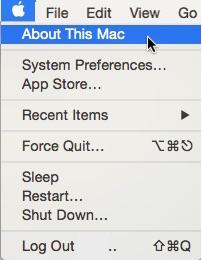
Note: If you are using Yosemite (OS X 10.10) or later, you will not see the following panel.
Instead you will see the panel at Step 3, further below. Skip to Step 3.
Step 2:. Click More Info
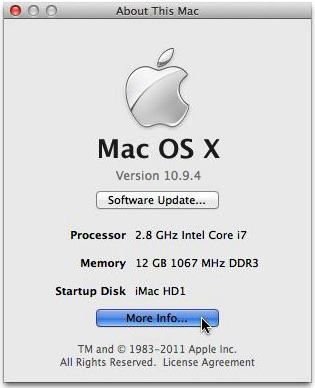
Note: Step 3 (below) is not required for versions of the OS prior to Lion 10.7.
Users of such earlier systems should skip to Step 4.
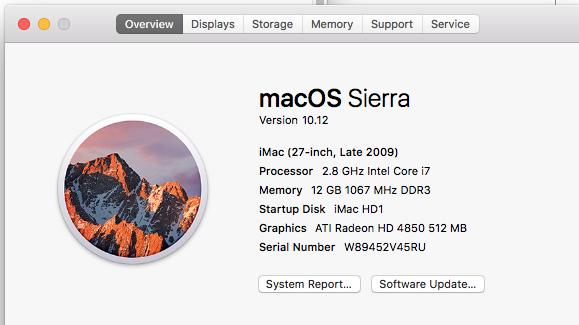
Step 3: Click Overview, then System Report.
(Sierra shown; earlier systems very similar)
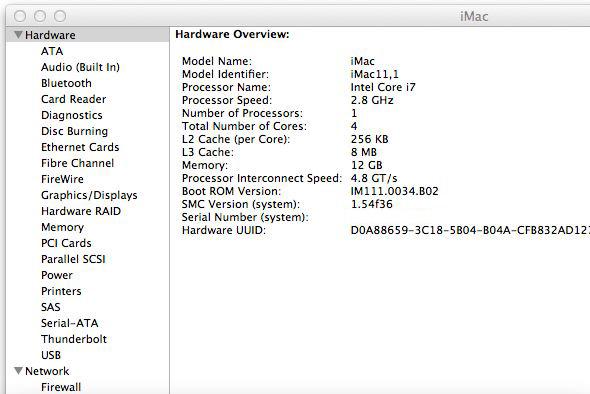
Step 4: Click a topic in the left hand column to see more information. If the item of interest occupies only a single line, click the small grey triangle to its left, to expand it.
Copyright macfixer 2016
.

Wallace Training Pty Ltd
48 Eastfield Road Croydon South Vic 3136 Australia
Ph 1300 MACFIXER
Abn: 45 077 719 996


